TGYRO
MITIM can be used to run the TGYRO transport solver, interpret results and plot relevant quantities. This framework does not provide licenses or support to run TGYRO, therefore, please see Installation for information on how to get TGYRO working and how to configure your setup.
Once setup has been successful, the following regression test should run smoothly:
python3 MITIM-fusion/tests/capability_tests/tgyro_01_run_from_inputgacode.py
Run TGYRO from an input.gacode file
For this tutorial we will need the following modules:
from pathlib import Path
from mitim_tools.gacode_tools import TGYROtools,PROFILEStools
Select the location of the input.gacode file to start the simulation from. You should also select the folder where the simulation will be run:
gacode_file = Path('MITIM-fusion/tests/data/input.gacode')
folder      = Path('MITIM-fusion/tests/scratch/tgyro_tut')
Create a PROFILES class from the input.gacode file:
profiles = PROFILEStools.gacode_state(gacode_file)
Tip
Note that the profiles class can be plotted, for convenience.
profiles.plot()

Now the TGYRO class can be created:
tgyro = TGYROtools.TGYRO()
tgyro.prep(folder,profilesclass_custom=profiles)
Now it is time to set the TGYRO settings, such as the radial range (vectorRange[0] to vectorRange[1]), number of points to simulate (vectorRange[2]), the solver parameters, physics and TGLF options:
rhos            = [0.3,0.5,0.7,0.9]
solver          = { 'step_jac':    1E-2,
                    'step_max':    1E-2,
                    'res_method':     2,
                    'tgyro_method':   6,
                    'relax_param':   0.1 }

physics_options = { 'TypeTarget':2 }   # 2: Only evolve exchange, 3: Reactor
PredictionSet   = [1,1,0]              # Profiles to predict: [Te, Ti, ne]
iterations      = 5                    # Number of TGYRO iterations
TGLFsettings    = 'SAT2em'             # TGLF pre-set (see templates/input.tglf.models.yaml)
Now TGYRO can be run:
tgyro.run( subFolderTGYRO        = 'run1',
           iterations            = iterations,
           special_radii         = rhos,
           PredictionSet         = PredictionSet,
           TGLFsettings          = TGLFsettings,
           TGYRO_solver_options  = solver,
           TGYRO_physics_options = physics_options)
Read:
tgyro.read(label='run1')
And plot:
tgyro.plot(labels=['run1'])
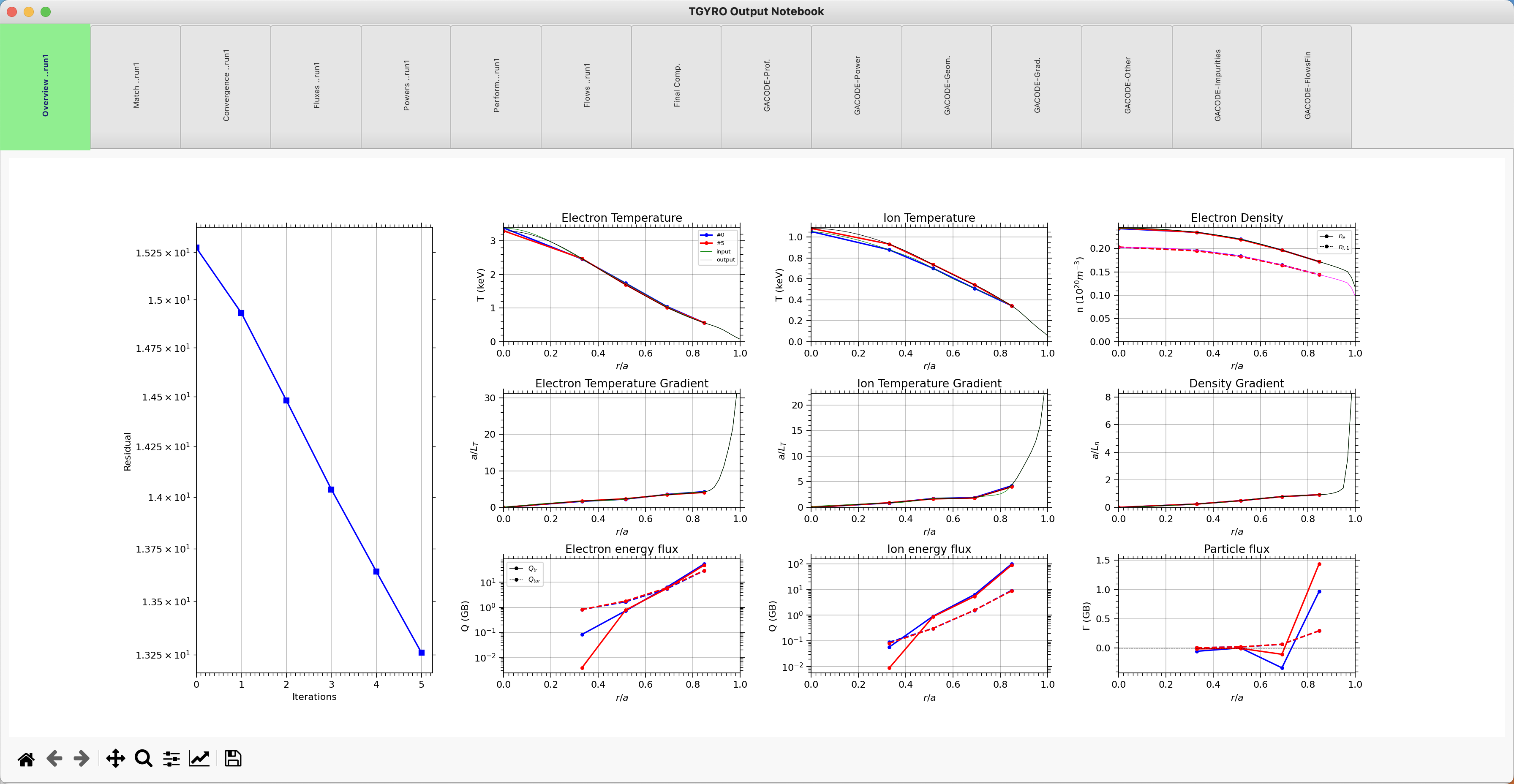
As a result, a TGYRO notebook with different tabs will be opened with all relevant output quantities:
Read TGYRO results that were run externally
Create a profiles class with the input.gacode file that TGYRO used to run and the folder with all output files:
from pathlib import Path
from mitim_tools.gacode_tools import TGYROtools,PROFILEStools

gacode_file = Path('MITIM-fusion/tests/data/input.gacode')
folder      = Path('MITIM-fusion/tests/scratch/tgyro_tut/run1')

profiles    = PROFILEStools.gacode_state(gacode_file)
tgyro_out   = TGYROtools.TGYROoutput(folder,profiles=profiles)
Plot results:
tgyro_out.plot()
TGYRO aliases
MITIM provides a few useful aliases, including for the TGYRO tools: Shell Scripts